
Microsoft 365 Copilot 또는 Copilot Studio에서 리스닝마인드 DaaS API를 연동하는 방법입니다.
사전 준비사항
REST API 연동
| 항목 | 내용 |
| API Key | ListeningMind DaaS API Key 발급 완료 (계약 후 제공) |
| 인증 방식 | API Key 인증 |
| Base URL | https://listeningmind-data-api.ascentlab.io |
| 인증 헤더 | LM-API-KEY: <발급받은 API Key> |
| 권장 사용 | 데이터 연동, 내부 시스템 통합 |
MCP Server 연동
| 항목 | 내용 |
| MCP Server ID/PW | ListeningMind DaaS MCP Server ID/PW 발급 완료 (계약 후 제공) |
| 인증 방식 | OAuth 인증 |
| MCP Server URL | https://listeningmind-daas-mcp.ascentlab.io |
| 권장 사용 | AI 플랫폼 Tool/Connector 연결, Agent 기반 데이터 탐색 |
[!] 주의사항 – 주요 설정 UI 및 연동 절차는 각 플랫폼 환경에 따라 다를 수 있습니다. 자세한 설정 방법은 해당 플랫폼의 공식 문서를 참고하십시오. – 각 플랫폼의 MCP 지원 여부 및 기능은 변경될 수 있습니다. 최신 정보는 각 플랫폼의 공식 문서를 확인하십시오.
Copilot Studio에서 New Tool(REST API) 추가하는 방법
[참조] 마이크로소프트 공식 가이드 문서를 참조하세요.
Copilot Studio 접속 https://copilotstudio.microsoft.com
공통 진입 경로 : Tools 탭 → Add a tool → New tool
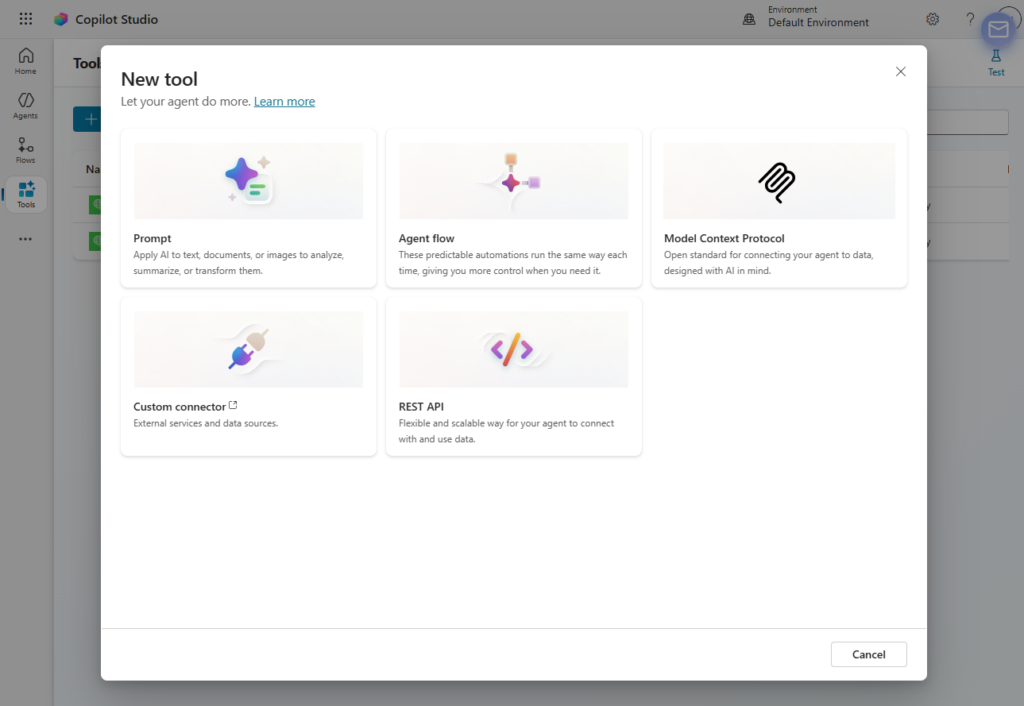
Step 1. New tool → REST API 선택
- Tools 탭 → Add a tool → New tool → REST API
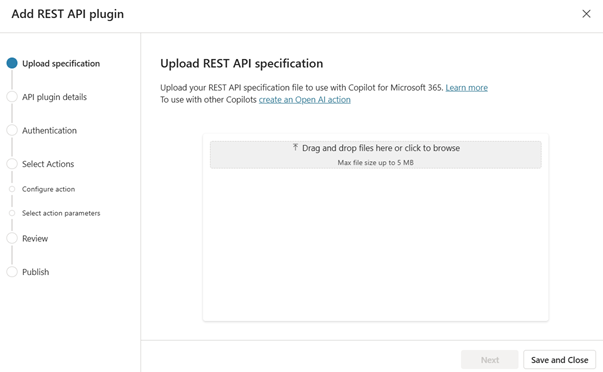
Step 2. OpenAPI 스펙 업로드
- OpenAPI JSON 파일 드래그&드롭 또는 직접 업로드
- 파일 확인 후 Next
Step 3. API 설명 & 솔루션 지정
- Description: 언어 모델이 이 툴을 언제 호출할지 판단하는 기준 → 구체적이고 풍부하게 작성
- ListeningMind is a search intelligence API that provides real-time consumer search behavior data from Korea, the United States, and Japan. Use this API to retrieve, analyze, find, and explore keyword search volume, search trends, consumer intent signals, keyword clusters, and search path patterns. This tool should be invoked when the user wants to:
– Look up, check, or get search volume or trend data for any keyword or topic
– Discover, extract, or identify related keyword groups, clusters, or topic buckets
– Understand, analyze, or explore what users are searching for and why (search intent)
– Trace, map, or find what keywords or pages consumers navigate through before reaching a destination (search path, funnel, journey)
– Conduct market research, competitive analysis, or consumer insight analysis using search data – Generate reports or insights based on actual search behavior data
Synonyms and related actions: keyword research, SEO analysis, search trend analysis, consumer behavior analysis, market signal detection, demand forecasting, brand mention tracking, search funnel analysis, topic modeling from search data
- ListeningMind is a search intelligence API that provides real-time consumer search behavior data from Korea, the United States, and Japan. Use this API to retrieve, analyze, find, and explore keyword search volume, search trends, consumer intent signals, keyword clusters, and search path patterns. This tool should be invoked when the user wants to:
- Solution: 환경 내 솔루션 선택 (미선택 시 자동 생성)
Step 4. 인증 방식 설정 : API 키(API key) 선택
Step 5. 툴(액션) 선택 & 구성
- API에서 에이전트에 허용할 툴 선택
- 각 툴마다 이름과 설명 작성, 파라미터 입출력 설명 보완
- Next → 전체 검토 → Next (publish)
Actions 정의
Definition 탭 → New Action 클릭 후 엔드포인트별로 등록합니다.
리스닝마인드 DaaS API 기술문서 참조 : https://listeningmind-data-api.ascentlab.io/
| 엔드포인트 | Request Body 스키마 | Response 스키마 |
| POST /keyword_info | keywords(array), gl(string), data_type(string) | Import from sample → API 응답 JSON 붙여넣기 |
| POST /intent_finder/keyword_list | keywords(array), gl(string), limit(integer) | Import from sample → API 응답 JSON 붙여넣기 |
| POST /path_finder | keyword(string), gl(string), limit(integer) | Import from sample → API 응답 JSON 붙여넣기 |
| POST /cluster_finder | keyword(string), gl(string), data_type(string) | Import from sample → API 응답 JSON 붙여넣기 |
Step 6. Connection 생성 & 에이전트에 추가
- REST API 타입에서 새로 생성된 툴 선택
- Create new connection → 인증 정보 입력 → Create
- Add and configure → 완료
Custom Connector 생성
| 항목 | 설정값 |
| 경로 | Settings → Connectors → Custom Connectors → New |
| Host | listeningmind-data-api.ascentlab.io |
| Base URL | / |
| 인증 방식 (Security) | API Key |
| Parameter name | LM-API-KEY |
| Parameter location | Header |
| Value | 환경 변수 LM-API-KEY 참조 |
Topic 에서 활용 및 테스트
| 단계 | 내용 |
| Topic 생성 | Topics → New Topic 생성 |
| Trigger 설정 | 트리거 입력: ‘키워드 분석’ |
| Action 노드 | Action 노드 추가 → 생성한 Connector Action 선택 |
| 테스트 | Test → ‘냉장고 키워드 분석해줘’ 입력하여 확인 |
Copilot Studio에서 New Tool(MCP Server) 추가하는 방법
[참조] 마이크로소프트 공식 가이드 문서를 참조하세요.
- MCP 온보딩 마법사를 사용하여 에이전트를 기존 MCP 서버에 연결합니다.
- MCP 서버가 아직 없는 경우 MCP 서버를 만듭니다.
- Copilot Studio 에이전트가 사용할 수 있도록 에이전트에 MCP 서버 도구 및 리소스를 추가합니다.
- (선택 사항) MCP 커넥터를 게시하여 여러 테넌트에서 커넥터를 사용할 수 있도록 합니다.
STEP 0. Generative Orchestration 활성화
MCP 사용을 위한 필수 선행 작업입니다.
- copilotstudio.microsoft.com 접속
- 연동할 에이전트 선택 → Settings 탭
- Generative AI 섹션 → Generative orchestration 토글 ON
- Save 클릭
STEP 1. MCP Server 연결
에이전트 선택 → Tools 탭 Add a tool 클릭 New tool → Model Context Protocol 선택
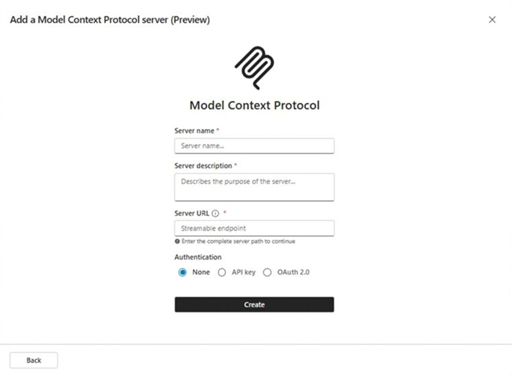
STEP 2. 기본 서버 정보 입력
| 설정 항목 | 값 |
| 경로 | Copilot Studio → Settings → Plugins → MCP Servers → Add Server |
| Server Name | ListeningMind-DaaS (식별용 이름) |
| Server description | 리스닝마인드 DaaS API를 통해 키워드 검색량, 연관 키워드, 검색 경로, 소비자 인식 클러스터를 조회하는 검색 인텔리전스 서버입니다. 한국/일본/미국 시장의 실제 소비자 검색 행동 데이터를 제공합니다. |
| Server URL | https://listeningmind-daas-mcp.ascentlab.io |
| Authentication | OAuth 2.0 |
| 완료 확인 | 연결 테스트 후 토픽에서 활용 |
⚠️ Description은 AI 오케스트레이터가 이 MCP 서버를 언제 호출할지 판단하는 기준입니다. 구체적이고 상세하게 작성할수록 정확하게 호출됩니다.
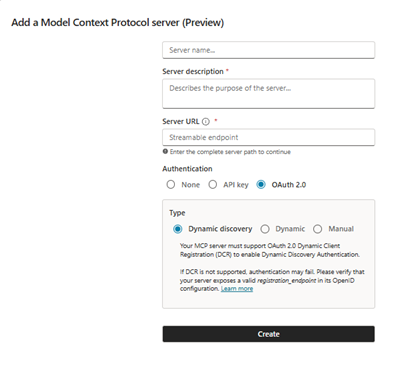
STEP 3. 인증 방식 설정 (OAuth 2.0)
- MCP Onboarding Wizard에서 Authentication type → OAuth 2.0 선택 후, → Dynamic Discovery 선택
- Create 클릭
STEP 4. Connection 생성 & 에이전트에 추가
MCP 서버를 에이전트에 도구로 추가하려면,
- 좌측 메뉴에서 Agents 선택
- Create blank agent. 클릭
- 에이전트 기본 정보 등록
- Tools → Add tool → Model Context Protocol
- Create new connection → Create
- 리스닝마인드 DaaS에서 제공받은 ID/Password 입력 → 로그인
STEP 5. 툴 구성 확인
MCP 서버가 에이전트에 추가되면 서버가 제공하는 모든 툴이 기본 ON 상태입니다.
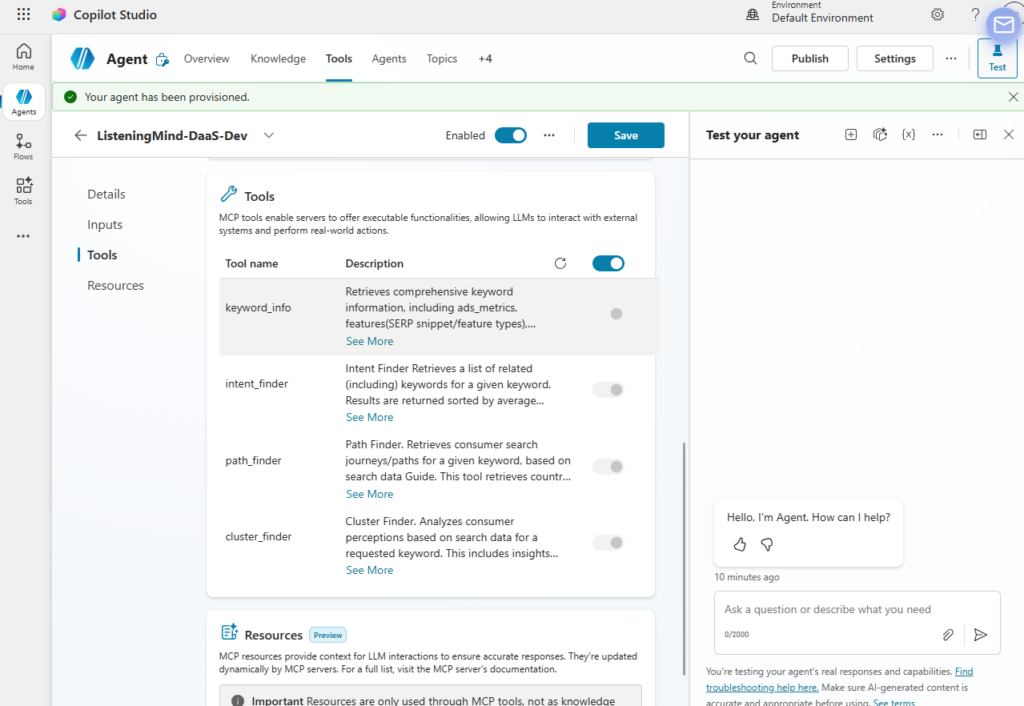
- Tools 탭 → ListeningMind DaaS 서버 선택
- Tools 섹션에서 제공 툴 목록 확인:
-
keyword_info— 키워드 검색량/광고지표/SERP/의도/인구통계 - i
ntent_finder— 연관 키워드 추출 -
path_finder— 검색 경로 분석 -
cluster_finder— 소비자 인식 및 관계 네트워크 분석
-
STEP 6. 에이전트 Description 최적화
각 툴의 Tool description 필드를 업데이트하면 오케스트레이터 정확도가 높아집니다.
Tools 탭 → 각 툴 선택 → Details > Description 편집
ListeningMind DaaS is a search intelligence API providing real-time consumer search behavior data for Korea (kr), Japan (jp), and the US (us). Use this API to retrieve, analyze, and explore: – Keyword search volume, CPC, ad competition, SERP features, search intent (I/N/C/T), and user demographics (keyword_info) – Related keyword lists from 1–100 seed keywords (intent_finder/keyword_list) – Consumer search journey sequences and funnel paths (path_finder / path_finder/keyword_list) – Consumer perception clusters and keyword relationship networks (cluster_finder / cluster_finder/keyword_list) Invoke when the user asks about: 키워드 검색량, 연관 키워드, 검색 경로, 소비자 여정, 소비자 인식 그룹, 시장 분석, SEO, 광고 경쟁도, 인구통계, keyword research, search trend, consumer journey, keyword cluster, ad competition, market analysis, search funnel, brand positioning, demographic analysis, CEP, related keywords, long-tail keywords. Do NOT invoke for general web search or questions unrelated to Korean/Japanese/US search behavior data
STEP 7. Test 동작 확인
- 우측 Test your agent 패널 열기
- 아래 예시 질문으로 테스트:
"OOO" 키워드의 한국 월별 검색량 추이를 알려줘"OOO" 관련 연관 키워드 100개 뽑아줘"OOO" 키워드를 중심으로 소비자 검색 경로를 분석해줘에이전트가 자동으로 적절한 툴(
keyword_info
,
intent_finder
,
path_finder
)을 선택해서 호출하면 정상 연동 완료입니다.


